
In 2025, security researchers showed a Cursor agent connected to a Supabase database through MCP could be tricked into leaking a private tokens table. The attack did not exploit a bug. A support ticket contained hidden instructions, and the agent, running with a database role that bypassed row-level security, followed them.
That incident is the whole lesson in one story. MCP makes it easy to connect AI to your database. The risk is not the protocol. It is the permissions you give it and the untrusted data it reads. This guide covers the real threats and the controls that contain them. If MCP is new to you, start with what MCP is.
The root problem: models cannot tell instructions from data
Every MCP security issue traces back to one fact. A language model reads instructions and data in the same stream, and it cannot reliably tell them apart. So text that arrives as "data," a database row, a ticket, a web page, can carry instructions the model obeys.
This is prompt injection, and on Hacker News one commenter stated the core of it: the model "needs an ironclad distinction between 'this is input from the user telling me what to do' and 'this is input from the outside that must not be obeyed.' Until that's figured out, any attempt at security is going to be full of holes."
Simon Willison named the dangerous combination the "lethal trifecta": access to private data, exposure to untrusted content, and a way to communicate externally. A database MCP server gives the first. Your data gives the second. Avoiding the third, and limiting the first, is the job.
The attack classes worth knowing
You do not need to be a security engineer to govern this well. You do need to recognize the main attack shapes.
| Attack | How it works | Who showed it |
|---|---|---|
| Prompt injection | Untrusted content carries hidden instructions the model follows | Widely documented |
| Tool poisoning | Malicious instructions hidden in a tool's description | Invariant Labs, Apr 2025 |
| Toxic agent flow | A trusted tool is steered to exfiltrate data | Invariant Labs, May 2025 |
| Rug pull | A server changes a tool's behavior after you approve it | Invariant Labs |
| Over-broad permissions | The AI's database user can do more than read | OWASP LLM06 |
Tool poisoning is the sneaky one. The model reads a tool's full description; the user usually sees only its name. A description can quietly instruct the agent to read a private file and pass its contents through an innocent-looking parameter.
The GitHub MCP exploit showed the toxic agent flow. A malicious issue in a public repo coerced an agent into pulling private-repo data into a public pull request. No tool was compromised. The trusted tools were simply pointed at the wrong target.
Real incidents, not hypotheticals
These are documented, dated, and worth citing when you make the case for governance internally.
| Incident | What happened | Date |
|---|---|---|
| MCP Inspector RCE | CVE-2025-49596, CVSS 9.4: remote code execution on developer machines via the Inspector proxy | Jun 2025 |
| Supabase data leak | An agent with a privileged role was tricked into dumping a tokens table | Mid 2025 |
| GitHub MCP exploit | Private-repo data leaked through a toxic agent flow | May 2025 |
The community sees the pattern. On r/mcp, one practitioner described the ecosystem as "the wild Wild West of npm all over again," and said they treat "every piece of open software in this ecosystem as a virus." Caution is the correct default.
The control layer that contains it
Good governance puts a layer of controls between the AI tool and your database. Nothing reaches the data without passing through it.
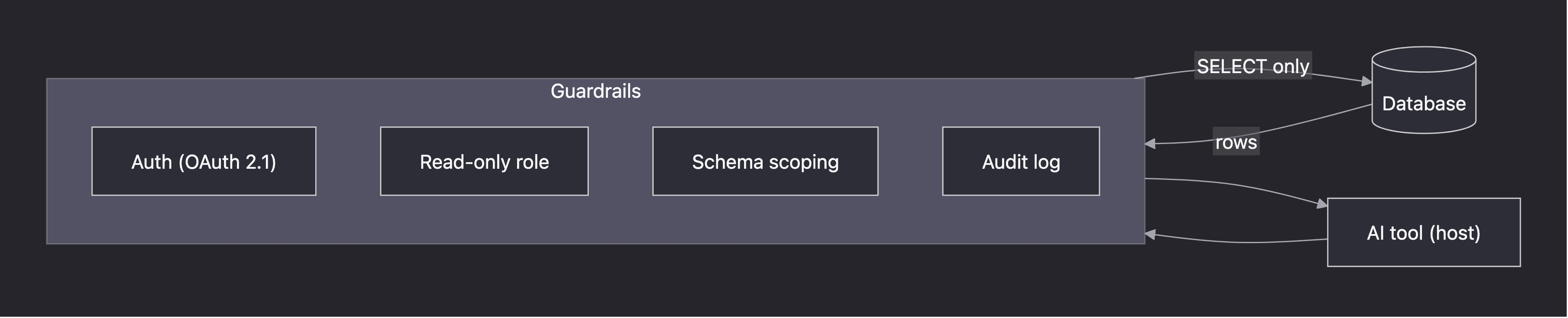
Each control answers a specific risk. The mapping below is the practical core of this article.
| Risk | Control |
|---|---|
| Destructive query (DELETE, DROP) | Read-only database user |
| Agent reaches data it should not | Scope the connection to one schema |
| Runaway or expensive query | Statement timeouts and row limits |
| Production blast radius | Point at a read replica, not prod |
| Silent misuse | Audit log every query, with who and when |
| Bad result acted on blindly | Human review for anything that matters |
Read-only is the single most important control
If you do one thing, do this. Connect the AI through a read-only database user.
A read-only role runs SELECT and nothing else. It cannot INSERT, UPDATE, DELETE, or DROP. So even a successful prompt injection hits a wall: the database refuses the destructive statement. OWASP's excessive agency guidance names the exact anti-pattern, an extension meant to read data that connects "using an identity that not only has SELECT permissions, but also UPDATE, INSERT and DELETE permissions."
The Supabase incident was this mistake. The agent ran with a role that bypassed row-level security. Our guide on read-only users in Postgres shows the few lines it takes to do this right. Sequel runs read-only by default, so the safe path is the default path.
Scope, limit, and log
Read-only is the floor, not the ceiling. Three more controls round out database governance.
- Scope the access. Limit the connection to the schema the AI should see. Supabase's own defense-in-depth guidance recommends project and schema scoping, plus pointing at non-production data.
- Limit the queries. Statement timeouts and row limits stop a runaway query from straining the database. These are standard database hygiene, applied here.
- Log everything. Record every query the AI runs, with who asked and when. Supabase puts it plainly: "Monitor and log all MCP queries." An audit trail is how you review activity and catch the unexpected.
How authentication works
For remote MCP servers over HTTP, the current spec defines an OAuth 2.1 model. The MCP server acts as a resource server, with a separate authorization server. It requires PKCE and audience-bound tokens, and it forbids token passthrough, so a server must reject tokens not issued for it.
Local stdio servers do not use this. They read credentials from the environment instead. The distinction matters: a remote database server needs real authorization, while a local one inherits the trust of the machine it runs on.
Govern it like any data access
MCP database access is data access. The same governance you apply to a BI tool or a new analyst applies here. The OWASP Top 10 for LLM Applications is the right framework, with prompt injection, sensitive information disclosure, and excessive agency as the entries that map most directly to a database.
Shared, governed connections beat a dozen personal setups. When access lives in team workspaces with read-only connections, you control it in one place instead of trusting every laptop. That is also where an AI data analyst earns its keep over a raw, self-built server.
Your pre-flight checklist
Before you connect any AI tool to a database over MCP, confirm:
- The connection uses a read-only user.
- Access is scoped to the right schema, ideally a replica.
- Queries are logged with who, what, and when.
- Third-party servers are from trusted sources and reviewed.
- A human reviews anything consequential.
Get these right and MCP is safe to put in front of your data. Want a server that ships read-only and scoped by default? Get started free, or see how to query your database with AI using MCP.