
You can now query your database with AI in plain English, from inside Claude or Cursor, and get the answer back without writing a single line of SQL. The piece that makes this work is a small open standard called MCP, the Model Context Protocol.
Anthropic released MCP on November 25, 2024. A year later, the community had built thousands of MCP servers, and the official registry held close to two thousand entries, up 407% in three months. OpenAI, Google, and Microsoft all adopted it in 2025. The standard that lets AI talk to your database is no longer niche.
This guide explains what it means to query a database with AI, how MCP makes the connection, what you need to set it up, and how to do it without putting your data at risk. For the protocol itself, read our companion guide on what MCP is.
What "querying your database with AI" actually means
You type a question. Something reads your schema, writes the SQL, runs it, and hands back rows or a chart. That something is an AI data analyst, and MCP is how it plugs into the AI tools you already use.
The translation layer is text-to-SQL: a large language model turns "how many trials converted last month" into a real query. The model only writes good SQL when it knows your tables, columns, and how they join. Schema context is the whole game, which is why we cover it in how text-to-SQL works.
MCP is the wire between the AI tool and that schema-aware query engine. Without it, every tool needs its own custom database integration. With it, one server speaks to all of them.
The round trip: question to answer
Here is the full path a question takes when you query your database over MCP. The AI tool is the host. Sequel is the MCP server connected to your database.

Five things happen in order. The table below maps each step to what the MCP server is doing under the hood.
| Step | What you see | What happens behind it |
|---|---|---|
| 1. Ask | You type a plain-English question | The AI host receives your prompt |
| 2. Discover | A short pause | The host lists the server's tools and reads your schema as context |
| 3. Generate | "Running a query..." | The model writes SQL from the question and schema |
| 4. Execute | Rows or a chart appear | The server runs the SELECT against your database, read-only |
| 5. Explain | A written answer | The model reads the rows and answers in plain language |
The discovery step is the one people miss. The model cannot write a correct query for a schema it has never seen. The MCP server exposes your schema so the model knows orders joins customers on customer_id, not by guessing.
Why MCP, and not a custom integration
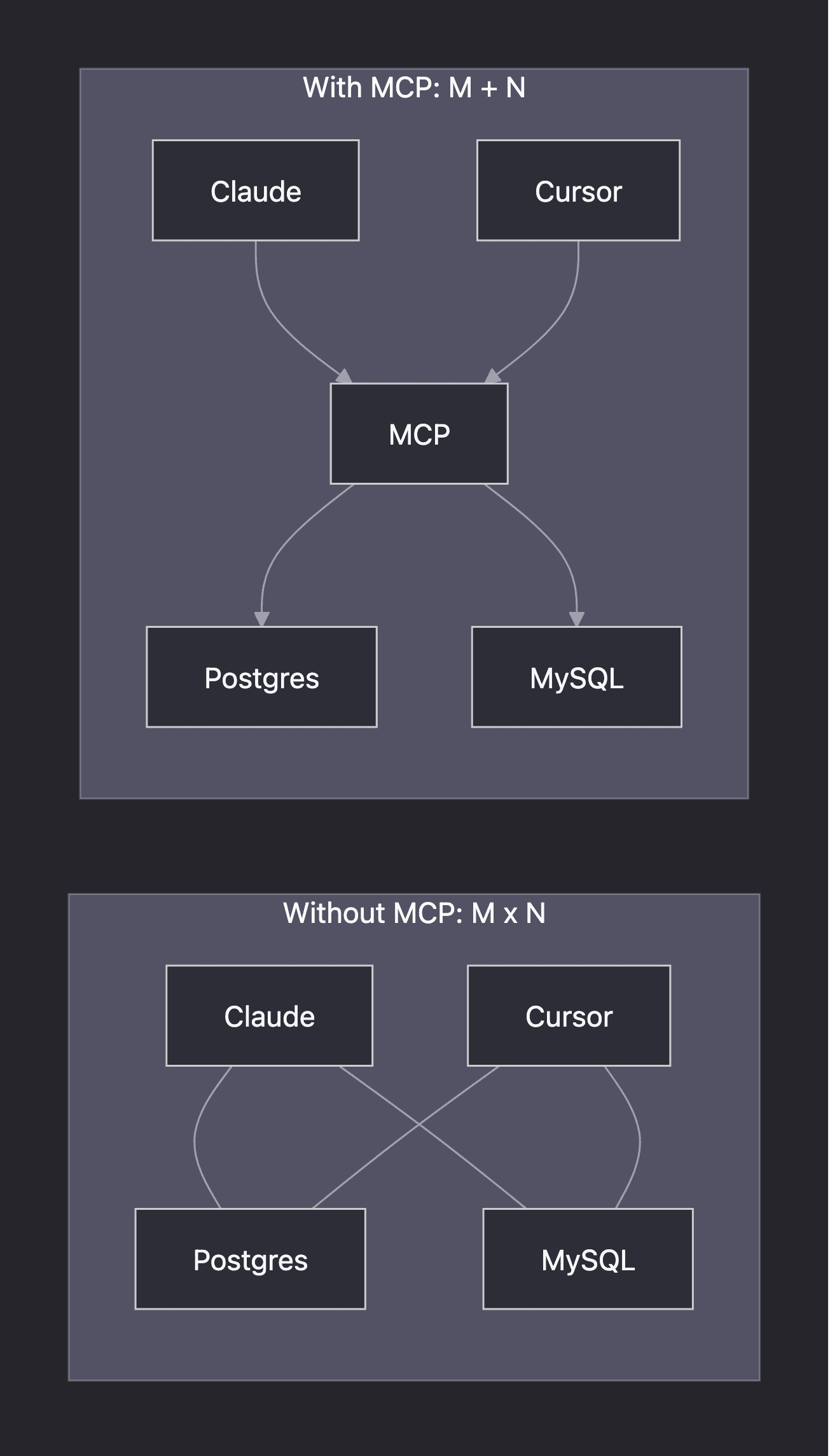
Before MCP, connecting an AI tool to a database meant building a bespoke integration for that exact pairing. Five tools and five data sources meant up to twenty-five integrations. Anthropic calls this the M×N problem.
MCP collapses it to M plus N. Each tool implements MCP once. Each data source exposes an MCP server once. They all interoperate. The official analogy is "a USB-C port for AI applications": one connector, many devices.
For you, that means the same database connection follows you between tools. Connect once in Sequel, then query from Claude today and Cursor tomorrow. No rebuild.
What you need to query a database with AI
Three pieces, and you likely have the first already.
- An MCP-capable AI tool. The host that runs the conversation.
- A database MCP server. The bridge to your data. Sequel's MCP server is built for this and handles schema context and read-only safety for you.
- A read-only database connection. So the AI can read but never write.
Most popular AI tools now act as MCP hosts. Here is where the common ones stand.
| AI tool | Acts as MCP host | Sequel setup guide |
|---|---|---|
| Claude Desktop | Yes | Connect PostgreSQL to Claude Desktop |
| Claude Code | Yes | Connect PostgreSQL to Claude Code |
| Cursor | Yes | Add the Sequel MCP server in settings |
| ChatGPT | Yes | Connect PostgreSQL to ChatGPT |
| OpenAI Codex | Yes | Connect PostgreSQL to Codex |
You do not build any of this. With Sequel you connect your database in the dashboard, then add the Sequel MCP server to your tool with a config snippet. For the protocol mechanics behind the connection, see MCP for databases.
How to set it up, step by step
The flow is the same regardless of database or tool.
- Connect your database to Sequel. Add your connection in the dashboard. Use a read-only user. Our guide on read-only users in Postgres shows how to create one.
- Add the Sequel MCP server to your AI tool. Paste the config snippet, or use a one-click install where supported.
- Ask a question. Type "what was revenue by plan last month" and watch the round trip run.
That is the whole setup. The connect guides walk through each database and tool pairing with screenshots.
What you can ask once it is connected
The point of querying with AI is that the people who used to wait on the data team can answer their own routine questions. A few examples by team:
| Team | A question they can now ask directly |
|---|---|
| Finance | "What was net revenue by plan, month over month?" |
| Marketing | "Which campaigns drove signups that converted to paid?" |
| Customer success | "Which accounts dropped usage in the last 30 days?" |
| Product | "What is the funnel from signup to first query?" |
Each of these is a question you have once, not a dashboard you check daily. That is exactly where asking beats building a report. We cover the dividing line in AI data analyst vs BI tools.
A worked example
Say a finance lead types: "what was net revenue by plan last month?" The MCP server hands the model your schema, and the model writes something like this.
SELECT plan,
       SUM(amount) AS net_revenue
FROM invoices
WHERE status = 'paid'
  AND invoiced_at >= date_trunc('month', current_date - interval '1 month')
  AND invoiced_at <  date_trunc('month', current_date)
GROUP BY plan
ORDER BY net_revenue DESC;
The server runs it read-only, returns the rows, and the AI tool charts them. The finance lead never wrote SQL. They also see the query, so they can confirm it filtered to paid invoices and the right month before trusting the number. That visibility is the difference between a tool you can trust and a black box.
How accurate is the SQL?
Good, not perfect, and you should know the gap. On the BIRD benchmark, which grades text-to-SQL against real databases, the best models reach about 82% execution accuracy. Human data engineers score roughly 93%. As of December 2025, that leaves an 11-point gap.
So treat the generated query as a draft. The strongest internal systems agree. Uber, after shipping its own text-to-SQL tool, noted that hallucinated tables and columns "remain an area that we are constantly working on". Read the SQL, or have someone who can. We break down the numbers in how accurate text-to-SQL is.
The practitioners on r/SQL are blunt about it. One top comment put it simply: "You should never run AI generated queries blind." A tool that shows you the SQL it wrote lets you follow that advice.
Keeping it safe
Giving an AI access to your database sounds risky. It is manageable with a few habits.
- Connect read-only. A read-only role runs SELECT and nothing else. It cannot DELETE, UPDATE, or DROP. Sequel runs read-only by default.
- Scope the access. Limit the connection to the schema the AI should see, not the whole cluster.
- Keep a human in the loop. Review queries that matter before acting on the results.
- Watch for prompt injection. Untrusted data can carry hidden instructions. This is a real attack class, not a hypothetical.
These are not optional niceties. We go deep on the threats and the controls in MCP security and governance, including why over-privileged database users are the single most common mistake.
Where this is heading
The distance between "I have a question" and "here is the answer" keeps shrinking, and MCP is the standard closing it. Connect your database once, and every AI tool you use can read it, safely, in plain English. Want to try it on your own data? Get started free or see how Sequel's MCP server works.